


 ORDER ON WHATSAPP

1. Introduction
Welcome to the HainoTeko Germany RW37 Watch Buds user manual. This innovative 2-in-1 device combines a smartwatch with integrated Bluetooth earbuds, designed for convenience and functionality. This manual provides essential information for setting up, operating, and maintaining your RW37 Watch Buds.
2. Safety Information
Please read all safety instructions carefully before using the device to ensure safe and proper operation.
- Do not expose the device to extreme temperatures or direct sunlight for prolonged periods.
- Avoid dropping or subjecting the device to strong impacts.
- Keep the device away from water and moisture, despite its waterproof rating, to prevent damage.
- Do not attempt to disassemble or repair the device yourself. Contact authorized service personnel.
- Use only the provided charging cable and a compatible power adapter (output below 2A) to prevent damage.
- Keep out of reach of children.
3. Package Contents
Verify that all items are present in your package:
- HainoTeko Germany RW37 Watch Buds Smartwatch
- Integrated Bluetooth Earbuds
- Leather Strap (1 pair)
- Rubber Strap (1 pair)
- Charging Cable
- User Manual (this document)

Figure 3.1: Items included inside the RW37 Watch Buds package.
4. Product Overview
The RW37 Watch Buds combine a smartwatch with a large round AMOLED display and integrated Bluetooth earbuds. The earbuds are housed within the watch body for convenient storage and charging.
4.1 Smartwatch Features
- Large Round AMOLED Display
- Multiple Built-in Dial Faces and Customizable Watch Faces
- Bluetooth Calling (with built-in microphone and speaker)
- Multi-sport Modes
- Health Monitoring: Heart Rate, Sleep, Blood Pressure
- Touch Control Interface
- Changeable Straps (2 pairs included)
4.2 Earbuds Features
- Integrated within the smartwatch for storage and charging
- Multifunctional Touch Control
- Built-in Microphone for calls
- High-quality audio for music and calls

Figure 4.1: HainoTeko RW37 Watch Buds with integrated earbuds and smartwatch display.

Figure 4.2: Using the integrated earbuds for communication.
5. Setup
5.1 Charging the Device
Before first use, fully charge your RW37 Watch Buds. Connect the charging cable to the charging port on the watch and plug the other end into a USB power adapter (not included). The watch display will indicate charging status.
Note: Ensure the power adapter output is below 2A.
5.2 Powering On/Off
- Power On: Press and hold the side button until the screen lights up.
- Power Off: Press and hold the side button, then select "Power Off" on the screen.
5.3 Pairing with Your Smartphone
To unlock full functionality, pair your RW37 Watch Buds with your Android or iOS smartphone via Bluetooth.
- Ensure Bluetooth is enabled on your smartphone.
- On the smartwatch, navigate to the Bluetooth settings or pairing mode.
- On your smartphone, search for available Bluetooth devices and select "RW37" or similar from the list.
- Confirm the pairing request on both devices if prompted.
- Once paired, the watch will display a connected status.
Note: For optimal performance and access to all features (e.g., health monitoring data, custom watch faces), download the dedicated companion application for the RW37 Watch Buds from your smartphone's app store. Scan the QR code provided in the package or search for "HainoTeko RW37" app.
6. Operating Instructions
6.1 Smartwatch Navigation
- Touch Screen: Swipe left/right, up/down to navigate menus and screens. Tap to select.
- Side Button: Press to return to the home screen or wake the device. Long press for power options.
- Changing Watch Faces: Long press on the home screen to access watch face options. Swipe to browse and tap to select.
- Accessing Quick Settings: Swipe down from the top of the screen.
- Accessing Notifications: Swipe up from the bottom of the screen.

Figure 6.1: Examples of multiple dial faces available on the RW37 Watch Buds.
6.2 Using the Earbuds
The earbuds are stored securely within the watch. To use them, simply open the watch cover and remove them.

Figure 6.2: Earbuds stored within the RW37 Watch Buds.
- Automatic Pairing: Once removed from the watch, the earbuds will automatically attempt to connect to the last paired device.
-
Touch Controls:
- Single tap: Play/Pause music, Answer/End call.
- Double tap (left earbud): Previous track.
- Double tap (right earbud): Next track.
- Long press: Reject call, Activate voice assistant.
- Charging Earbuds: Place the earbuds back into their slots within the watch. They will charge automatically from the watch's battery.
6.3 Health Monitoring
The RW37 Watch Buds can monitor various health metrics. Access these features through the watch's menu or the companion app.
- Heart Rate Monitoring: Wear the watch snugly on your wrist. Access the heart rate function on the watch to initiate a measurement.
- Sleep Monitoring: Wear the watch while sleeping. Data will be automatically recorded and can be viewed in the companion app.
- Blood Pressure Monitoring: Follow the instructions on the watch or app for accurate readings.
Disclaimer: The health monitoring features are for reference only and should not be used for medical diagnosis or treatment. Consult a medical professional for any health concerns.
6.4 Sports Modes
Select from various sports modes to track your activities. The watch will record data such as steps, distance, and calories burned.
- Navigate to the "Sports" or "Workout" menu on the watch.
- Select your desired activity (e.g., running, walking, cycling).
- Start the activity. The watch will begin tracking.
- End the activity when finished to save data.
7. Maintenance
7.1 Cleaning
- Wipe the watch and earbuds with a soft, dry, lint-free cloth.
- For stubborn dirt, slightly dampen the cloth with water. Do not use harsh chemicals or abrasive cleaners.
- Ensure the charging contacts on both the watch and earbuds are clean and dry before charging.
7.2 Strap Replacement
The RW37 Watch Buds come with two pairs of straps (leather and rubber) that can be easily interchanged.
- Locate the quick-release pins on the underside of the watch straps.
- Slide the pin inwards to detach the strap from the watch body.
- Align the new strap with the watch lugs and insert one end of the pin into the lug hole.
- Slide the quick-release pin inwards, align the other end with the opposite lug hole, and release the pin to secure the strap.
- Gently pull on the strap to ensure it is securely attached.
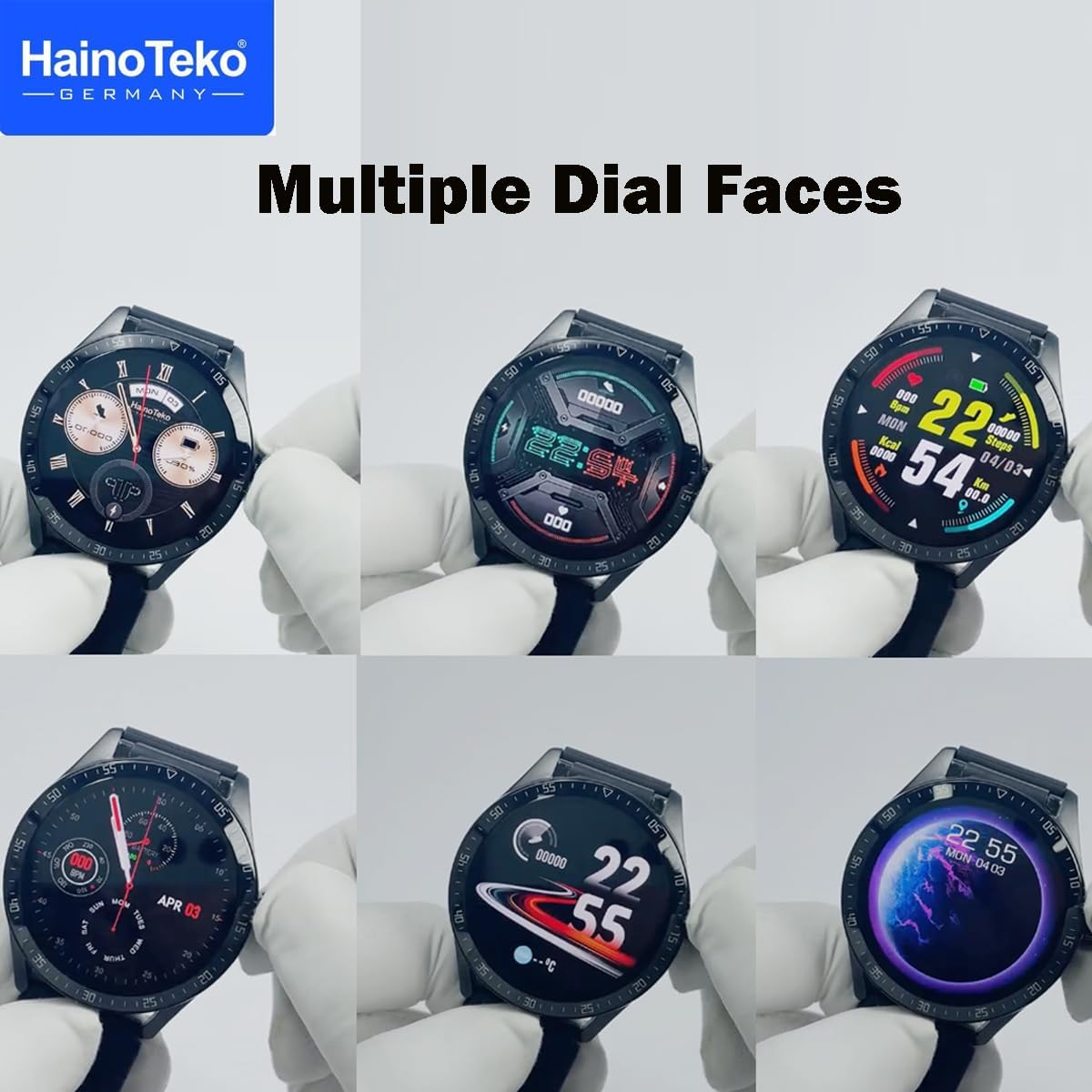
Figure 7.1: Interchangeable straps for the RW37 Watch Buds.
8. Troubleshooting
| Problem | Possible Cause | Solution |
|---|---|---|
| Device does not power on. | Low battery. | Charge the device for at least 30 minutes. |
| Cannot pair with smartphone. | Bluetooth is off on phone/watch; device out of range; pairing mode not active. | Ensure Bluetooth is on. Move devices closer. Activate pairing mode on watch. Restart both devices. |
| Earbuds not connecting/charging. | Earbuds not properly seated; dirty charging contacts; low watch battery. | Ensure earbuds are correctly placed. Clean charging contacts. Charge the watch. |
| Health monitoring data is inaccurate. | Watch not worn snugly; improper measurement technique. | Ensure watch is snug on wrist. Follow instructions for specific measurements. Avoid excessive movement during measurement. |
| No sound from earbuds. | Volume too low; not connected; media output not set to earbuds. | Increase volume on phone/watch. Re-pair earbuds. Check phone's audio output settings. |
If the problem persists, please contact customer support.
9. Specifications
| Feature | Detail |
|---|---|
| Model Number | RW-37 |
| Display Type | AMOLED |
| Connectivity | Bluetooth |
| Operating System | watchOS (as per product specifications, though this might be a generic term for smartwatch OS) |
| Compatibility | Android & iOS Devices |
| Special Features | Magnetic, Smart, Bluetooth, Display, Microphone, Speaker, Touch Control, Integrated Earbuds, Health Monitoring (Heart Rate, Sleep, Blood Pressure), Multi-sport Tracker, Changeable Straps |
| Product Dimensions | 15 x 5 x 0.5 cm |
| Item Weight | 210 g |
| Manufacturer | Haino Teko |
10. Warranty and Support
For warranty information and customer support, please refer to the warranty card included in your product packaging or visit the official HainoTeko Germany website. Keep your purchase receipt as proof of purchase.
For further assistance, you may contact HainoTeko Germany customer service through their official channels.